5 Ways for PNR Status Enquiry
Despite the efforts of Indian Railways ministry and HRD to provide awareness among people regarding online booking, PNR Status and IRCTC, a major proportion of passengers aren't aware of these terms in the first place, let alone knowing what they actually mean. So, to create awareness among people about the concept of PNR status, I have started this site.
Through my first hand experience and research, I've gathered information regarding numerous ways to check IRCTC PNR Status and compiled the list below. Hope you find the list helpful.
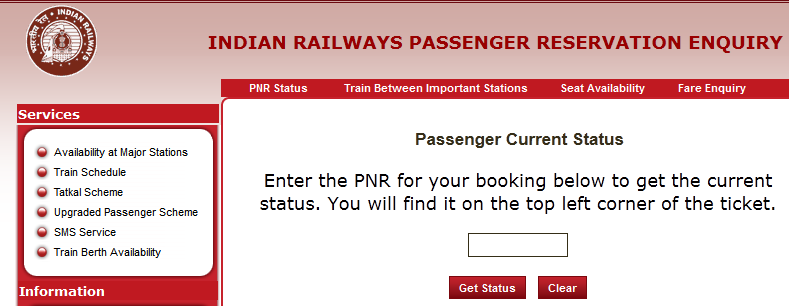
- As illustrated in the image above, you can also visit the Indianrailways.org website and input your 10-digit PNR Number for your booking and click Get status.
- Alternatively, you can use the link depicted in the top to view your PNR Status.
- You can log in to your IRCTC account and check your booking history (All the details including PNR Status would be displayed).
- You can SMS 'PNR space <your 10-digit booking number' to the railway enquiry number 139.
- You can alternatively call 139 (Non-Toll free) hotline and follow the automated voice instructions.
- Railway agents and employees working at the reservation counter will be glad to help or assist you in the process.
Make sure you check the current status before boarding the train, because if you are in the waiting list, you will not be granted entry or accommodation in the compartment. So, passengers prefer to cancel their tickets to get a full refund of the ticket amount. If you are placed in the RAC Status, you need not worry at all.
Click to visit the IRCTC site for complete information. You can also log in to your account, plan a travel and book train tickets for a specific date. Let me know if you have any questions or queries.
